Dynamic Analysis vs Static Analysis, Key Differences, Examples, and When to Use Each
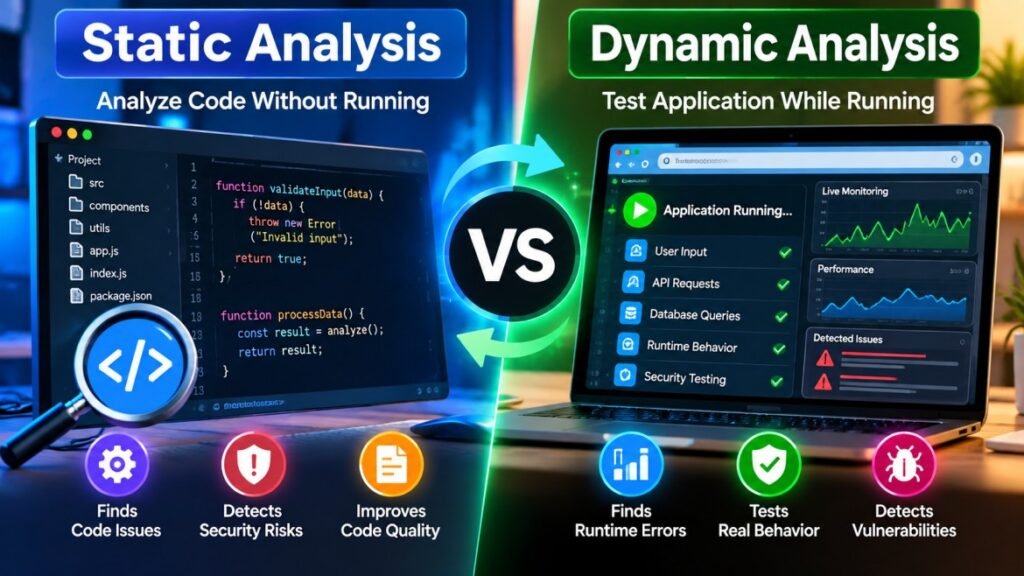
Software security testing plays an important role in building reliable applications, websites, and digital systems. Two common approaches developers use to identify defects and security weaknesses are static analysis and dynamic analysis. Although both techniques help improve software quality, they examine applications in different ways. Static analysis reviews source code without executing the program, while dynamic analysis tests software as it runs. Understanding dynamic analysis vs static analysis can help developers, security teams, and students choose the right testing method for their projects. In this guide, we explain how each approach works, explore practical examples, compare their advantages and limitations, and show when to use them individually or together.
What Is Static Analysis in Software Testing?
Static analysis is a software testing technique that examines source code, configuration files, or other supported software artifacts without running the application. Developers use static code analysis tools to identify potential bugs, suspicious coding patterns, security weaknesses, and maintainability issues early in the development process.
For example, imagine a developer creates a login function that handles user input. A static analysis tool may flag a potentially unsafe database query or a coding pattern that could expose the application to risk. The developer can then investigate and fix the problem before deploying the feature.
One of the main advantages of static analysis in software testing is that it can provide feedback during coding and code review. Depending on the tool, analysis can run inside an editor, from the command line, or as part of a continuous integration (CI) pipeline. However, a warning is not always proof of a real defect, and the results depend on the tool’s rules, language support, and configuration.
What Can Static Analysis Detect?
Static analysis tools can examine code for several types of potential problems. Their capabilities vary depending on the programming language, tool, and configuration, but common findings include syntax-related issues, suspicious code patterns, and possible security vulnerabilities.
Common examples include hardcoded passwords, potentially unsafe input handling, unused variables, unreachable code, and possible null reference errors. Some tools also check coding standards and help teams maintain consistent code quality across a project.
Static analysis does have limitations. It may report false positives, miss problems that depend on runtime behavior, or require additional configuration to analyze complex projects accurately. Developers should review findings carefully rather than assuming every warning represents a confirmed vulnerability.
What Is Dynamic Analysis in Software Testing?
Dynamic analysis is a software testing technique that evaluates an application while it is running. Instead of examining only the source code, developers execute the program and observe its behavior under specific conditions. This approach can help identify runtime errors, performance problems, memory issues, and certain security vulnerabilities.
For example, a developer might test a login page by entering valid credentials, incorrect passwords, and unexpected input. Dynamic testing can reveal how the application responds to these inputs and whether it behaves as expected. Security teams may also use specialized testing tools to examine a running website for potential vulnerabilities.
Dynamic analysis is useful because it tests actual program behavior in a running environment. However, it may require a working application, a suitable test environment, and carefully designed test cases. Problems that are not triggered during testing can remain undetected, so dynamic analysis does not guarantee that an application is completely secure.
What Can Dynamic Analysis Detect?
Dynamic analysis can help developers discover problems that appear when software executes. Depending on the testing method, these may include runtime exceptions, memory leaks, slow response times, and unexpected application behavior.
In security testing, Dynamic Application Security Testing (DAST) tools examine a running application from the outside. They send requests and analyze responses to identify potential weaknesses, such as certain injection vulnerabilities, insecure configurations, or problems with authentication and session handling.
However, dynamic testing only examines the behavior reached by the tests being performed. If a test never exercises a particular feature or code path, related problems may go unnoticed. Combining dynamic testing with code review, automated tests, and static analysis can provide broader coverage.
Static Analysis vs Dynamic Analysis: Key Differences
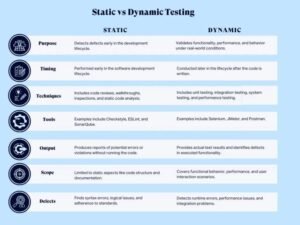
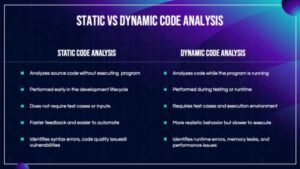
Static analysis and dynamic analysis both help improve software quality, but they examine applications differently. Static analysis reviews code without executing the program, while dynamic analysis evaluates software behavior during execution. The following table highlights their main differences.
|
Feature |
Static Analysis |
Dynamic Analysis |
|---|---|---|
|
How it works |
Examines code without running it |
Tests software while it runs |
|
Main focus |
Code patterns and potential defects |
Runtime behavior and failures |
|
Execution required |
No |
Yes |
|
Testing stage |
Often during development and code review |
During testing in a running environment |
|
Common findings |
Potential coding and security issues |
Runtime errors and certain security weaknesses |
|
Main limitation |
May produce false positives |
May miss untested code paths |
Practical Examples of Static vs Dynamic Analysis
Example 1: Static Analysis During Code Review
A developer submits a new feature for review before merging it into the main codebase. A static analysis tool scans the source code and flags a potentially unsafe use of user input. The developer investigates the warning, corrects the code if necessary, and runs the checks again. This process helps identify potential issues before the application is executed or deployed.
Example 2: Dynamic Analysis of a Running Application
A testing team launches a web application in a controlled test environment. Testers submit different inputs, check login behavior, and monitor application responses. They may discover an error that occurs only when a particular request is processed. The team then investigates the runtime behavior and fixes the issue before releasing the application.
Advantages and Limitations of Static and Dynamic Analysis
Advantages and Limitations of Static Analysis
Static analysis can help developers detect potential defects early, automate code reviews, and maintain consistent coding standards. It can also run as part of a continuous integration pipeline, allowing teams to receive feedback before code reaches production.
However, static analysis cannot always determine how an application will behave at runtime. Tools may generate false positives, miss certain defects, or require additional configuration. Developers should review findings and use other testing methods to verify application behavior.
Advantages and Limitations of Dynamic Analysis
Dynamic analysis allows teams to observe how software behaves in a running environment. It can reveal runtime failures, performance bottlenecks, and certain security weaknesses that may not be apparent from source code alone.
Its limitations include the need for an executable application or suitable test environment and well-designed test cases. Testing can take time, and defects may remain undiscovered if the relevant conditions are never exercised. Dynamic analysis should therefore be combined with other quality assurance practices when broader coverage is required.
When Should You Use Static vs Dynamic Analysis?
When Should You Use Static vs Dynamic Analysis?
The right testing approach depends on your development stage, application architecture, security requirements, and available resources. Static and dynamic analysis serve different purposes, so understanding when to use each method helps teams build a more complete testing strategy.
When to Use Static Analysis
Use static analysis when you want to inspect source code, identify potential defects early, enforce coding standards, or integrate automated checks into code reviews and CI pipelines. It is particularly useful when developers need fast feedback without running the entire application.
When to Use Dynamic Analysis
Use dynamic analysis when you need to observe actual application behavior, investigate runtime errors, measure performance, or test a running application for security weaknesses. It is especially useful for validating how different inputs, requests, and user actions affect the application.
Can You Use Both Methods Together?
Yes. Many development teams combine static and dynamic analysis to examine software from different perspectives. Static analysis helps identify potential issues in code, while dynamic analysis tests behavior during execution. Using both methods, alongside manual review and appropriate automated tests, can improve defect detection and provide broader testing coverage.
Popular Tools for Static vs Dynamic Analysis
Developers can choose from many tools for static and dynamic analysis. The right option depends on the programming language, application type, security requirements, and development workflow. Here are some widely used examples and their general purposes.

Static Analysis Tools
SonarQube
SonarQube analyzes source code to identify bugs, security-related issues, and maintainability problems across supported programming languages.
ESLint
ES-Lint helps JavaScript and TypeScript developers identify problematic patterns and enforce configurable coding rules.
Semigroup
Semigroup uses customizable rules to scan code for potential bugs and security weaknesses.
Dynamic Analysis Tools
OWASP ZAP
OWASP ZAP helps testers examine running web applications for potential security vulnerabilities.
Burp Suite
Burp Suite provides tools for testing web application security by inspecting and manipulating HTTP requests and responses.
Val grind
Val grind includes tools that help developers investigate memory-management errors and related problems while programs execute.
Common Mistakes to Avoid When Using Static and Dynamic Analysis
Although static and dynamic analysis are valuable testing techniques, using them incorrectly can leave important issues undetected. Understanding their limitations helps development teams build a more effective software testing process.
Relying on Only One Testing Method
Using only static or dynamic analysis may leave certain defects undiscovered. Static analysis examines code, while dynamic analysis tests runtime behavior. Combining both methods can help teams identify a wider range of potential problems.
Ignoring False Positives
Automated tools can sometimes report issues that are not actual defects. Developers should investigate warnings, verify findings, and adjust tool configurations when necessary instead of ignoring every alert or treating every warning as a confirmed vulnerability.
Testing Without a Clear Strategy
Running tools without defining testing goals can produce large numbers of findings without helping teams address the most relevant risks. Set clear objectives, prioritize issues according to their potential impact, and include appropriate checks in the development workflow.
Frequently Asked Questions
What Is the Main Difference Between Static and Dynamic Analysis?
Static analysis examines source code without executing the program, while dynamic analysis tests software while it is running. Static analysis helps identify potential code-level issues, whereas dynamic analysis reveals problems that occur during execution.
Is Static Analysis Better Than Dynamic Analysis?
Neither method replaces the other in every situation. Static analysis is useful for examining code early in development, while dynamic analysis helps evaluate real application behavior during execution. The appropriate choice depends on the project’s requirements, and using both methods can provide broader testing coverage.
Can Static and Dynamic Analysis Be Used Together?
Yes. Developers can use static and dynamic analysis together to identify different types of software defects. Static analysis examines source code, while dynamic analysis evaluates the application during execution. Combining both approaches with code reviews and automated tests can help teams improve software quality and security.
Conclusion
Understanding dynamic analysis vs static analysis helps developers choose the right testing techniques for their projects. Static analysis identifies potential issues in source code without running the application, while dynamic analysis examines software behavior during execution. Each method has its own benefits and limitations, so neither provides complete coverage on its own. By combining both approaches with code reviews and automated testing, development teams can identify a wider range of potential problems and build more reliable software.
For more Info: click here